Goals & KPIs
Replacing an old system that relies on the user to notice the problem. From now on, releasing a payment must pass through an active control gate: if a discrepancy is detected, the system blocks the action until a reasoned manual approval is given. The new system won’t let you miss the problem: clear, structured design, and clarity with no questions.
The success metrics I defined: the numbers I’ll measure after launch, that now explain to the CEO why it will worth the investment.
28 fields on one screen, cryptic error codes, and an “Approve” button that’s the most prominent thing on screen, with no block at all. Reconstructed from public documentation.
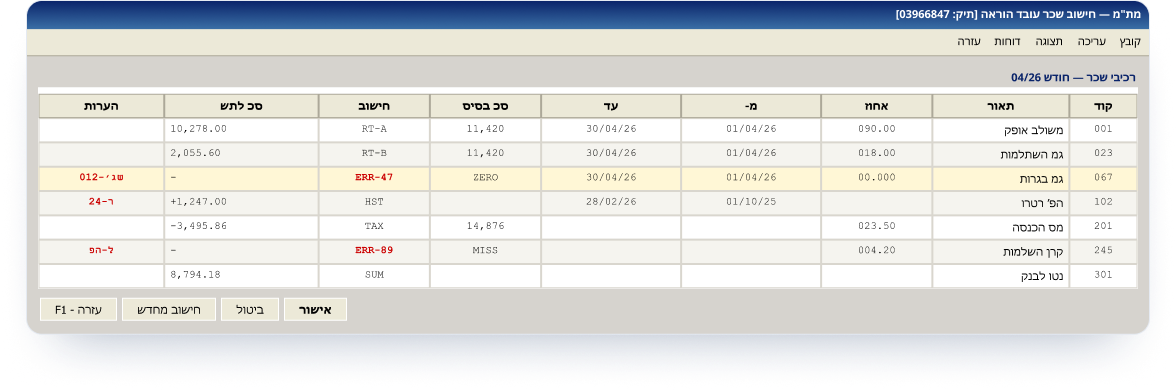
Not a calculation problem. An interface problem.
The MT"M system calculates brilliantly. What it doesn’t do is alert. The approval point sits after the calculation, with no chance to catch a problem in time. The old system relies on the user to notice the problem; a payment can go out even when the data is wrong, because nothing stops the process and forces a human check before the money leaves. This is a structural failure in the workflow, not a one-off glitch you can fix with a patch. So the error reaches the teacher’s bank before any human has seen it.
There’s no behavioral trigger at the right moment. The clerk sees a final amount with no context and approves, because nothing stops them.
Manual retroactive fixes, the union, headlines, the State Comptroller, and above all, eroded trust in a public system.
Three personas. Three conflicting needs.
The three needs pull in opposite directions. Designing for one hurts another, unless you solve it in the architecture. One design decision, made to work for three conflicting personas.
She started her career with a calculator and paper; moved to MT"M 18 years ago and knows every component code by heart. She doesn’t suffer the complexity. She masters it. Her problem is that the screen doesn’t distinguish a routine case from a dangerous one. Month-end is a race against the 25th, with a call every few minutes from a teacher who lost pay.
Wants less friction: let me approve fast. A clean, quick default.
He doesn’t dig into calculation details. He wants to know where risk accumulates and when his signature is required. His nightmare is learning about a pay crisis from the newspaper instead of the system, and facing the State Comptroller with no audit trail.
Wants oversight and visibility, not details. All the data rolls up into his dashboard.
Fast on the computer but lost in the domain. She works by instructions, performs actions she doesn’t deeply understand, and depends on Rachel for every question. Her ramp-up time is a real cost: half a year until she’s independent.
Needs more context: explain it to me. Every component is clickable and reveals a full explanation.
MT"M is the system in which the salaries of over 100,000 teaching staff in Israel are calculated and approved every month, run by the Ministry of Education. Budget clerks in the district offices review a table of salary components, base, supplements, deductions, retroactive differentials, cross-check them against the school’s report, and approve the monthly run that produces the payslip.
A day in Rachel’s life: the April payroll run.
“How much is left for me today?”
Logs in, sees the status of the monthly run.
Before: didn’t know where the problems were, manual search.
After: KPIs + “run almost ready, 90%.”
“Is everything OK here?”
Opens a teacher, reviews the salary components.
Before: black box, 4 screens to reconstruct.
After: clickable component, source, formula, approver.
“What’s the problem? How critical?”
System flags the matriculation bonus in red.
Before: would’ve been paid silently, surfaces at the teacher.
After: severity + explanation and a suggested action.
“How do I move forward from here?”
Sends an online approval request to the manager.
Before: dead end, no way to route an approval.
After: routing to the manager + a “pending” state.
“Approved? Who signed?”
The alert is resolved. She approves payment.
Before: blind approval, with no four-eyes check.
After: digital signature + Audit log.
“Done. Next in line.”
Payment approved, moves on to the next teacher.
Before: anxiety that something was missed.
After: explicit, detailed confirmation + a reference number.
What I considered, and rejected.
Every decision is a choice between two good things. This is the part that separates “I designed a screen” from “I navigated between conflicting constraints.”
A blanket block on every anomaly: zero incorrect payslips.
Rachel handles legitimate anomalies all day → blocking each one breeds workarounds. Worse than today.
A severity model: red blocks, orange warns, yellow notes. Only red stops the run.
Prevents the catastrophic error without paralyzing the 95% of ordinary cases.
Live validation on every keystroke against the full set of reform rules.
The old DB can’t take the load; validating every character is theater.
Validation on blur + cache, and a full gate at the moment of approval.
“Real-time the moment the money moves”: not everywhere.
Keep the dense table Rachel knows.
The dense table is the root cause: keeping it means keeping the failure.
A modern layout + a “power mode,” with the old code as a secondary label.
The migration risk, not the design, is the real risk.
Show every formula inline: maximum transparency.
That brings back the 28-field overload. Transparency turns into noise.
Collapsed by default, revealed on click.
Transparency on demand: the screen stays scannable.
The journey through the system: from login to secure payment.
The core flow is built as a decision tree. Every teacher is checked, and at the validation point the flow forks, a clean path vs. an alert-handling path, both merging into a two-step approval and secure payment.
Login + authentication
Identity · 2FA · role selection
Payroll-run dashboard
Run status · handling queue · alerts
Teacher profile
Select a teacher to handle
Calculation transparency
Salary-component breakdown · formulas · references
Differentials timeline
Every differential linked to the event that created it
Pre-payment review
Cross-check against rules, history and approvals
Ready for approval
Zero anomalies · green
Critical alert
What’s anomalous · why · the impact
Resolving the alert
Online approval request / document upload
Alert resolved
Component back to normal
▼ Both paths merge into the approval process
Payment approval · signature 1/2
Payroll coordinator approves
Finance manager approval · signature 2/2
Four-eyes control · digital signature
✓ Payment approved and released
Included in the run · logged in the Audit log
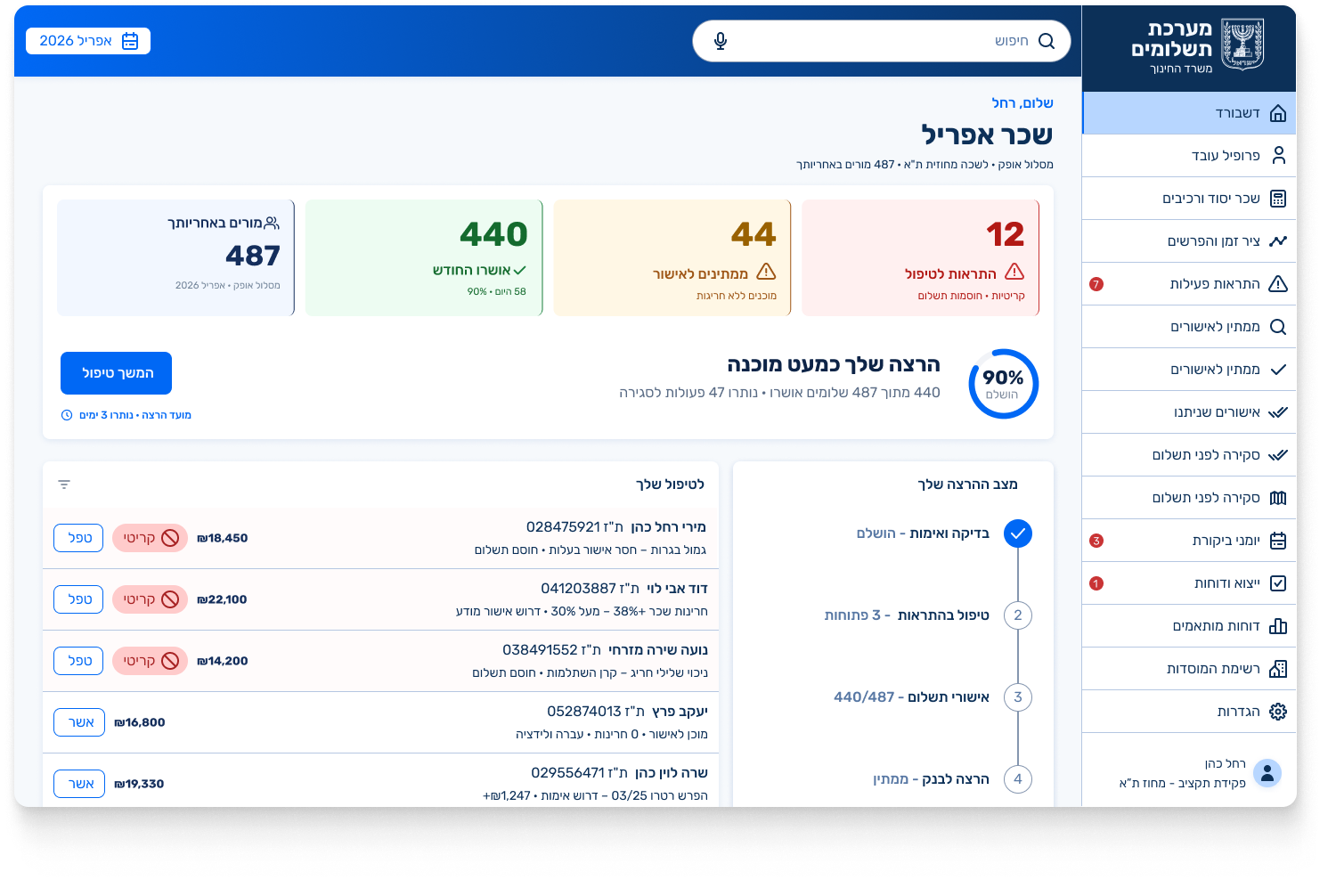
Entry point: knowing where the problem is.
Instead of opening a list of 487 teachers and searching, Rachel lands on a dashboard that instantly shows her how much is approved, how much is left, and what’s blocking payment, with a direct path to handle it. Every problem in the old system is tied to a specific move in the new interface, and to a real screen that demonstrates it.
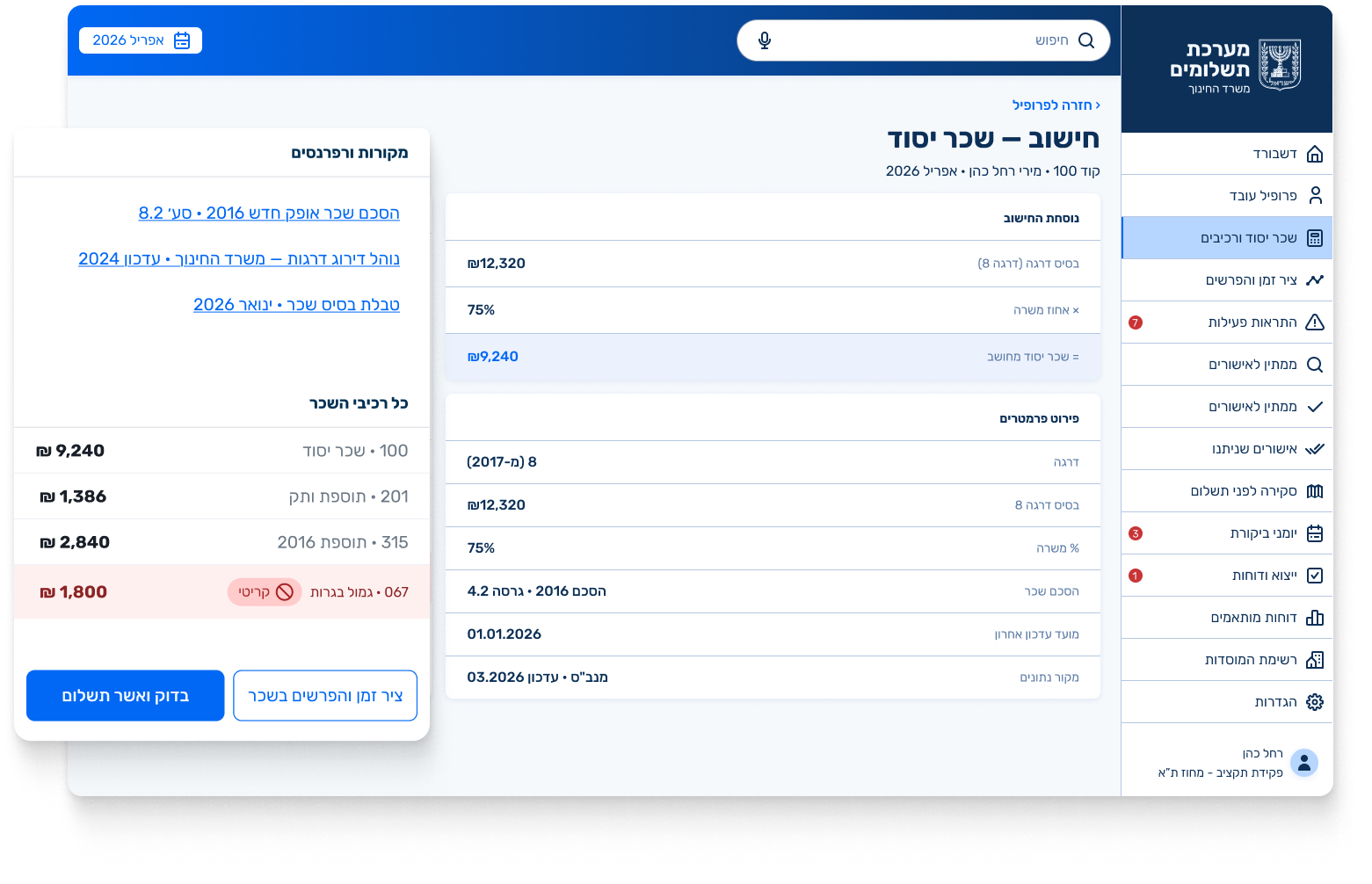
Calculation transparency
A teacher’s question required opening 4 different screens to reconstruct the calculation.
Base-salary breakdown screen. Every component is a clickable card that reveals the data source, the calculation formula and the legal references in one click, so even a new clerk understands every salary component without opening another screen.
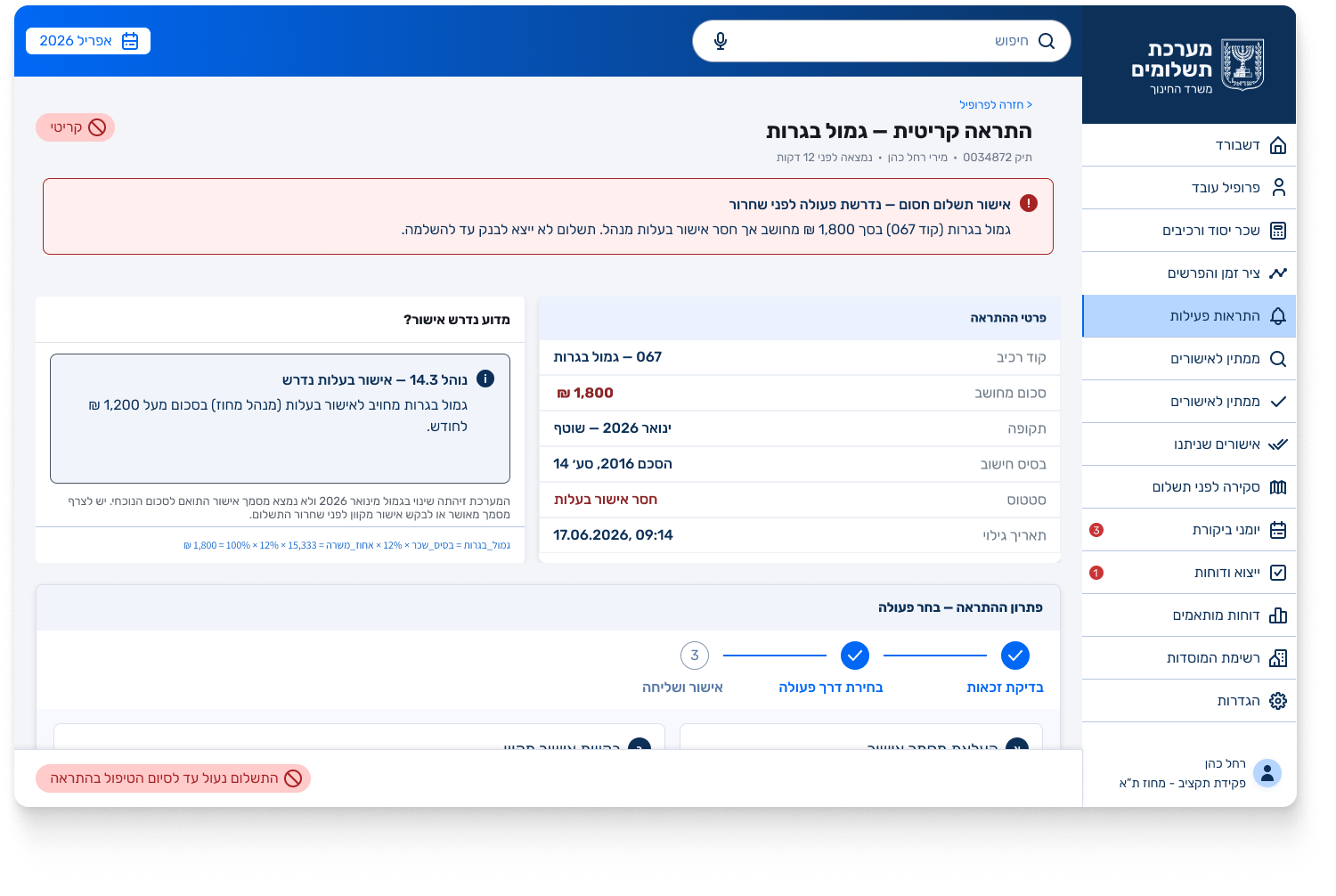
Anomaly detection
No flagging, no ranking. The clerk only notices when a teacher complains, and it surfaces only on the teacher’s payslip.
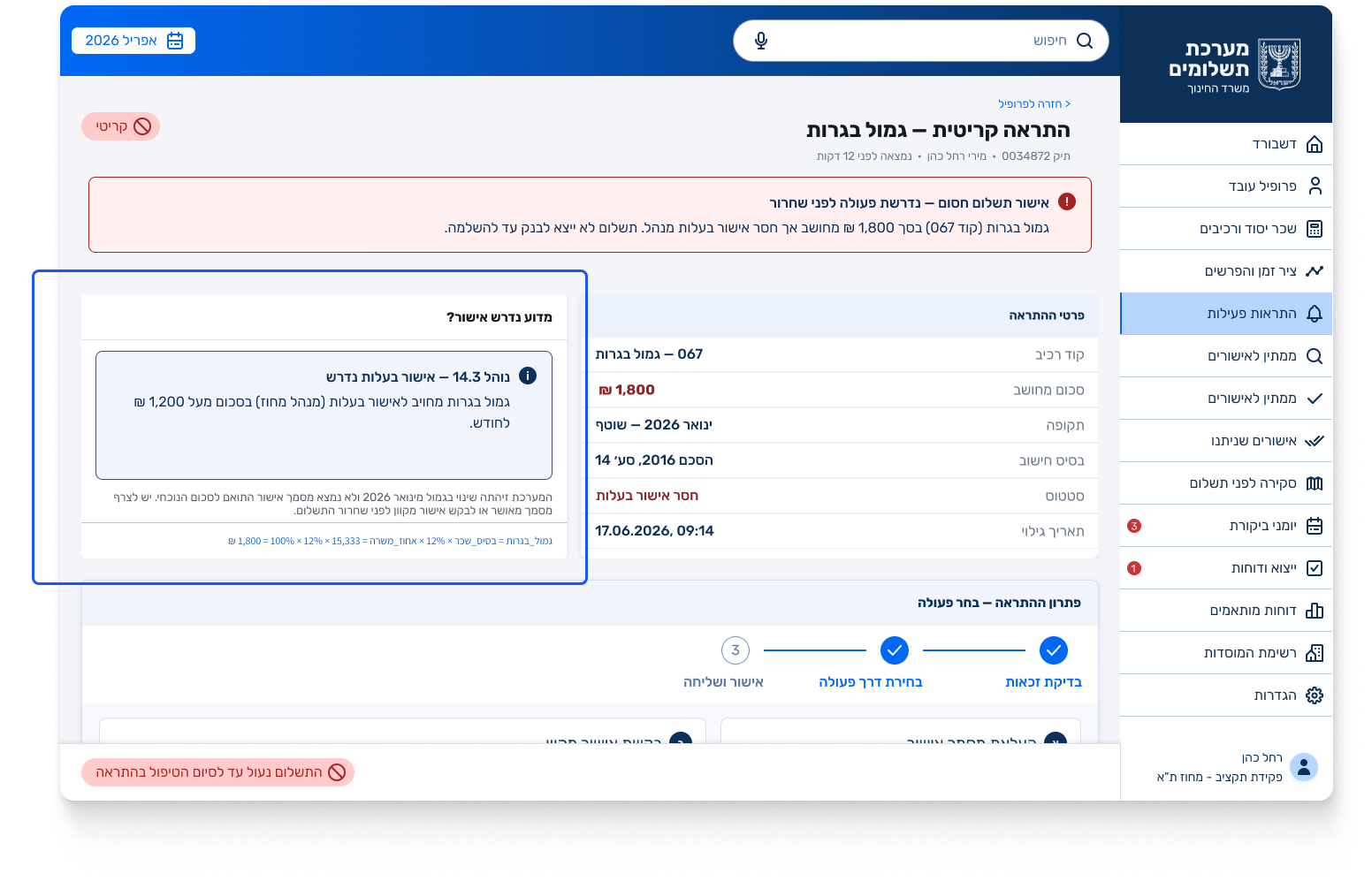
Critical-alert screen. The clerk sees what’s anomalous, why, and the impact, and two ways to resolve it are offered: upload the required approval, or send the manager an approval request. It gets a resolution path that fixes it before the change is even saved.
Alert
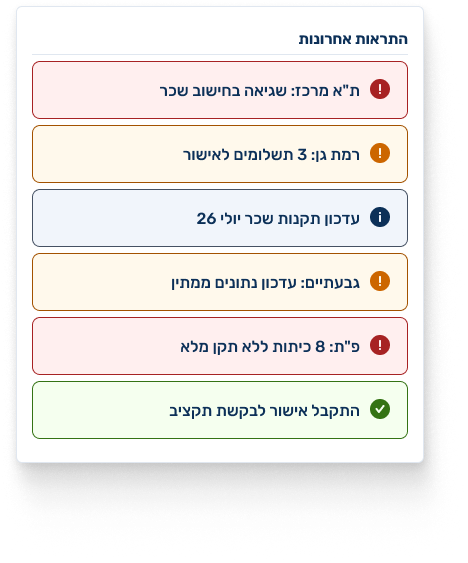
Alert urgency is ranked using warning/confirmation colors. Only critical-urgency alerts are flagged red, and only these halt the payment process until resolved. Any other, non-critical alert does not stop the system’s flow.
- ↳
Why approval is needed
The threshold for the seniority grant changed in January 2026, and no matching approval document was found for the current sum. A signed authorization or seniority-freeze approval is required before the payment.
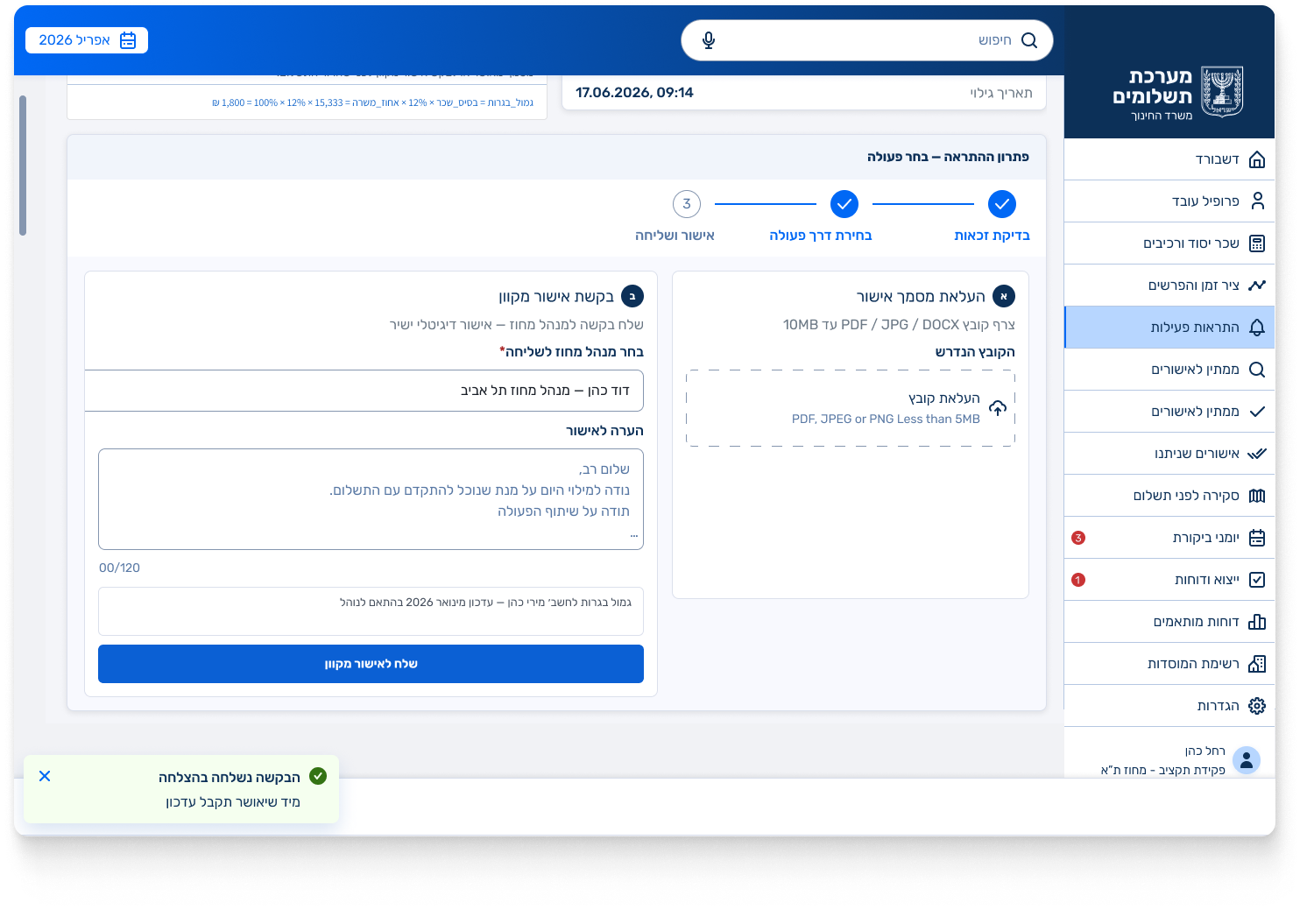
Resolving the alert
Right after the explained alert comes an action that resolves it: uploading required documents and sending an approval request, instead of a dead end.
Differentials timeline
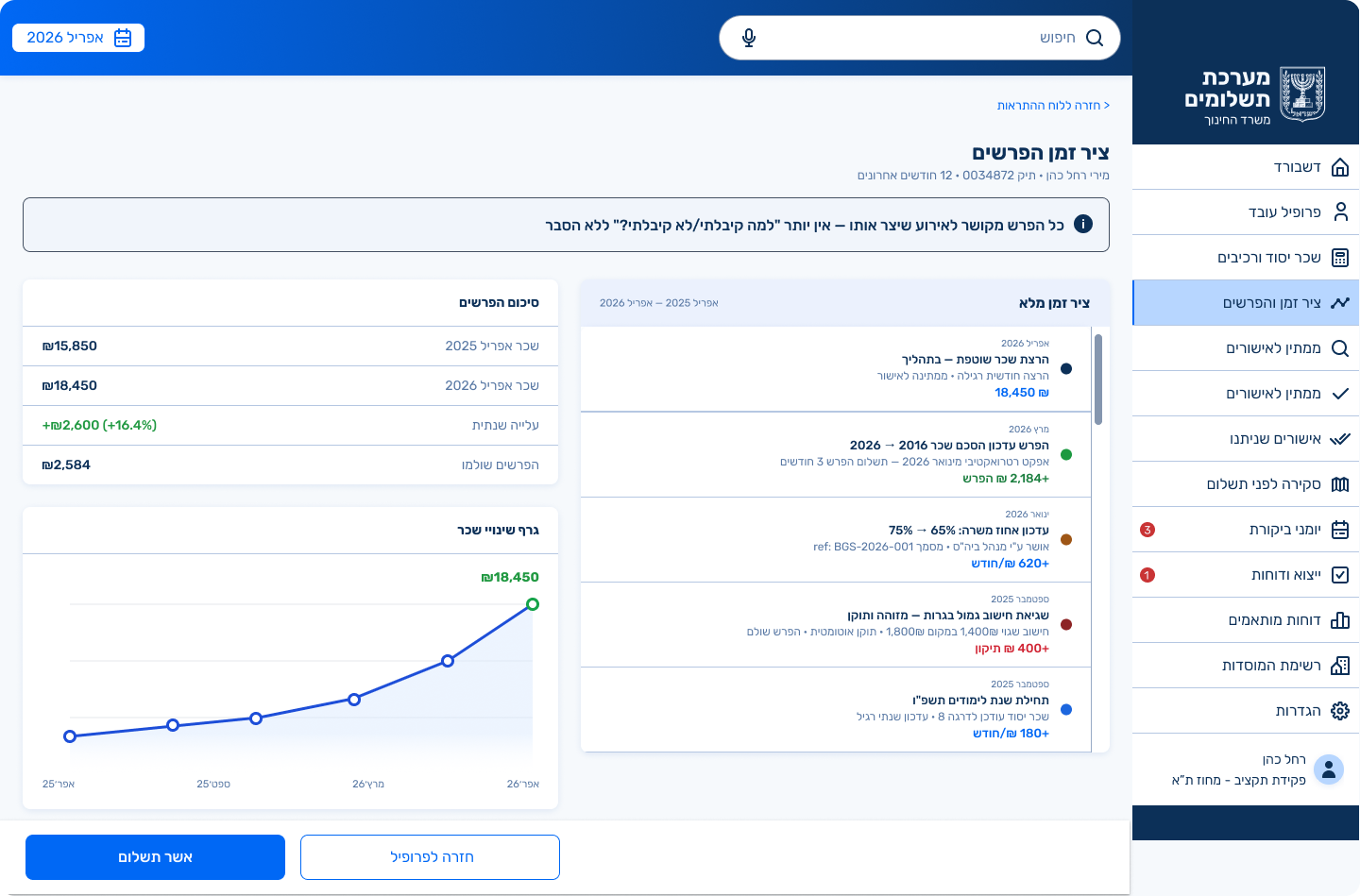
The system didn’t link the differential to the event that created it.
A visual timeline: grade change, retroactive recognition, error fix, with the amount and the explanation, so the teacher and the clerk understand exactly why.
Payment approval: final summary
Once all alerts are resolved, the payment goes through smoothly with zero calculation errors, and the flow closes on an unambiguous confirmation screen. Deposit details, checks and validations, and a full component table, closing the loop with a reference number and follow-up actions.
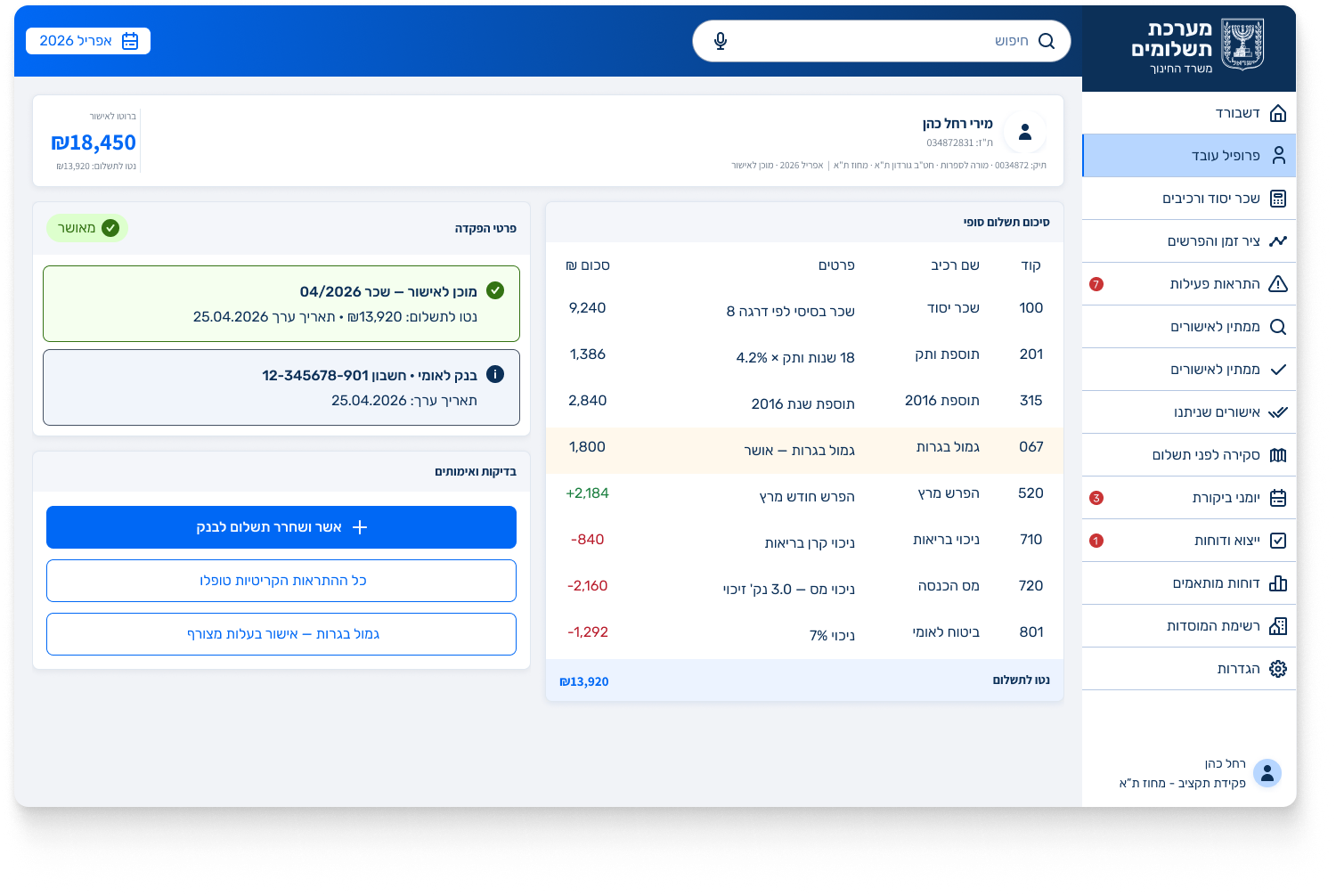
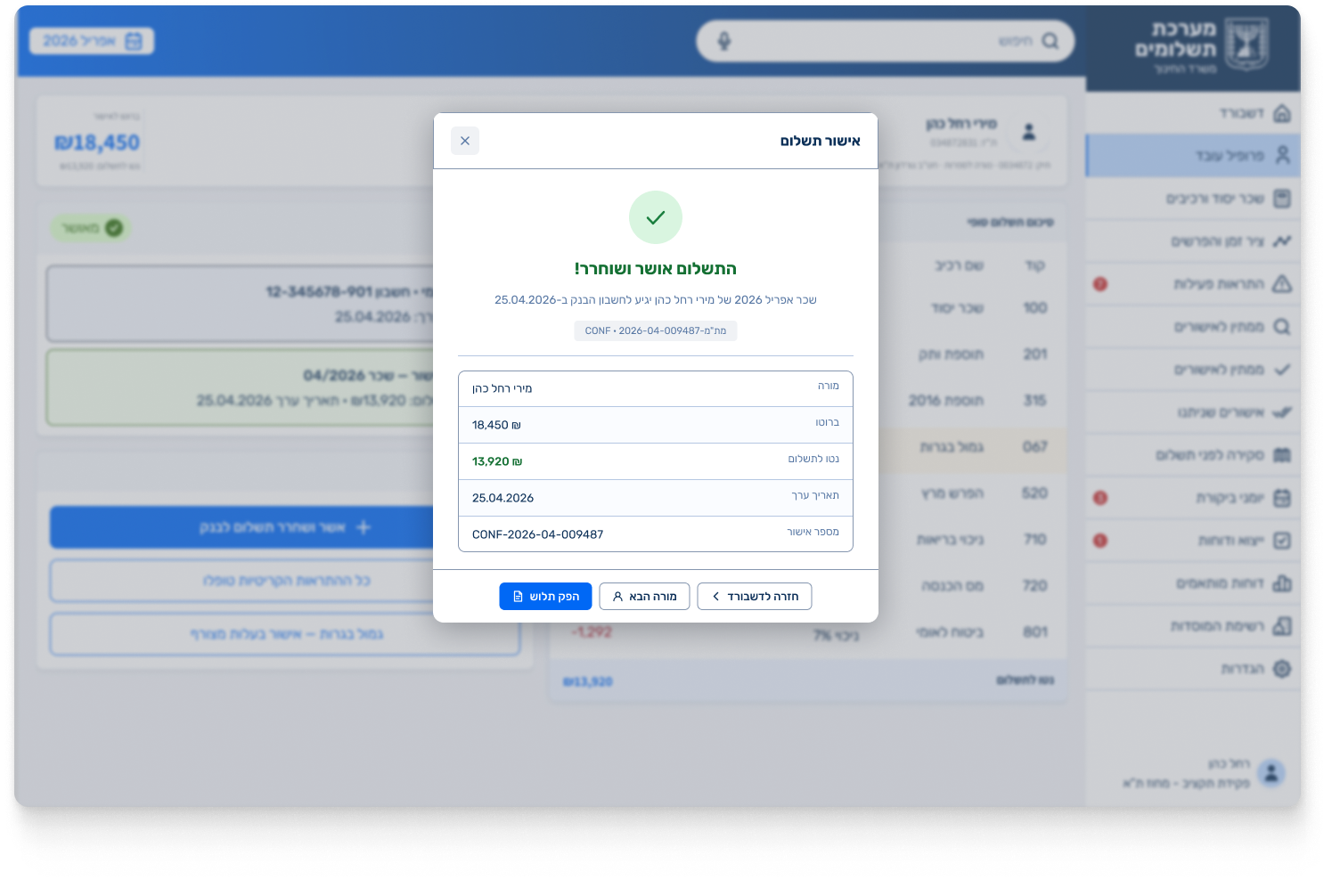
One flow. A whole story. A system that moves the stopping point to before the money moves, through calculation transparency, real-time validation, anomaly ranking and two-step approval.